8 min read
Disclosure: As an Amazon Associate and eBay Partner Network publisher, we earn from qualifying purchases. This doesn’t affect what we recommend or how we describe it.
If you’re shopping for the best ergonomic keyboard, you likely fall into one of three camps: you’re a remote worker logging hours at a desk and feeling the strain in your wrists, a gamer seeking relief from repetitive stress, or someone managing an existing condition like carpal tunnel syndrome. Each group cares about comfort, but the right keyboard can mean something different depending on your budget, typing habits, and the features you actually use day to day. This guide compares two standout options — one loaded with premium features, the other a reliable budget workhorse — so you can make a decision that matches your real needs, not just the marketing hype.
Top picks at a glance
- Logitech MX Mechanical Mini Wireless Illuminated Keyboard — the most feature-rich
- Microsoft Ergonomic Keyboard Model 1045 — the budget pick
How the top ergonomic keyboards compare at a glance

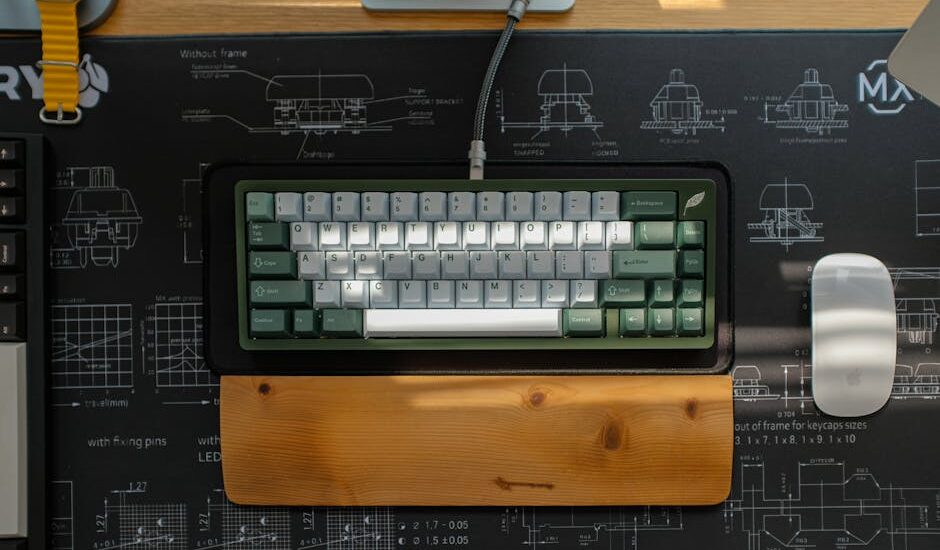
Pictured: Logitech MX Mechanical Mini
| Product | Condition | Price | Best For | Form Factor | Key Feature |
|---|---|---|---|---|---|
| Logitech MX Mechanical Mini Wireless Illuminated Keyboard |
Open Box | $$$ | Maximum features and wireless flexibility | Compact (Mini, 75%) | Wireless + Backlit |
 Microsoft Ergonomic Keyboard Model 1045 Microsoft Ergonomic Keyboard Model 1045 |
Used | $ | Affordable ergonomic basics | Full-size | Integrated wrist rest |
Pricing context: $, $$, and $$$ are relative ratings against the other products listed above, not absolute dollar ranges. Live current prices follow below.
Logitech MX Mechanical Mini: Feature-rich, compact, and wireless
By spec, the Logitech MX Mechanical Mini Wireless Illuminated Keyboard stands out as the most advanced option in this comparison. Designed for users who want the latest in wireless flexibility, this model is a 75% (mini) layout, meaning it drops the number pad to save desk space and improve mouse reach. It’s equipped with backlit keys for visibility in low light, mechanical switches for tactile feedback, and dual connectivity (Bluetooth and USB receiver) so you can pair it with multiple devices — Windows, Mac, or even tablets.
The backlighting is adaptive, adjusting to ambient light, and the battery life is rated for up to 15 days with backlight on, or up to 10 months with backlight off (according to manufacturer specs). The build is slim and portable, ideal if you move between workstations or value a clean, minimalist setup. If you’re sensitive to wrist strain, the low-profile keycaps and short actuation distance (typically around 1.3–1.5 mm) can reduce finger fatigue during long typing sessions.
However, the compact design means you sacrifice a dedicated number pad and may need time to adjust if you’re used to a wider layout. There’s also no permanently attached wrist rest, so if you need extra palm support, you’ll want to budget for a separate accessory.
Microsoft Model 1045: The budget-friendly classic
The Microsoft Ergonomic Keyboard Model 1045 is a full-size, split-keyboard design that prioritizes comfort and value. It features a built-in cushioned wrist rest, domed key arrangement, and a gentle curve to encourage a more natural hand position. This model connects via USB-A, so it’s a plug-and-play option for most desktops and laptops without worrying about battery life or wireless interference.
Compared with the Logitech MX Mechanical Mini, the Microsoft Model 1045 is larger and not as portable, but it’s well-suited for users who spend hours typing in one place. The soft-touch palm rest and full suite of function keys (including a number pad) make it a strong fit for spreadsheet-heavy workflows or anyone who prefers a traditional key feel. If you’re looking to minimize upfront costs, this keyboard’s used condition and budget tier make it the most affordable ergonomic upgrade available here.
Bear in mind that, as a used item, cosmetic wear is possible, and there are no advanced features like backlighting or wireless connectivity. But for straightforward ergonomic support, it covers the essentials.
Related Guides
- Exercise Balance Boards That Are Worth It: Our Honest Reviews
- What Is a Digital Force Gauge and How Does It Work?
- Heated Neck and Shoulder Wraps That Actually Relieve Pain
- How to Change the Band on Your Fitness Tracker: Step-by-Step Guide
- Our guide to Foot Circulation Boosters: A Practical Buyer’s Guide
- Our guide to Orthopedic Seat Cushions for Chairs: What to Know Before You Buy
Which ergonomic keyboard is right for you?
Choosing between these two models comes down to how you work and what you value most. If you want the latest mechanical switches, wireless freedom, and a compact footprint, the Logitech MX Mechanical Mini is the clear leader — especially for multi-device setups or hybrid work environments. For those who want reliable ergonomics at the lowest price, with a familiar full-size layout and integrated wrist support, the Microsoft Model 1045 is the logical pick.
Neither keyboard is a one-size-fits-all solution. If you rely heavily on a number pad, the compact Logitech may feel cramped. If you need to switch between devices or work in dim lighting, the Microsoft won’t offer those features. But both provide tangible ergonomic benefits over standard flat keyboards, which are widely acknowledged to contribute to repetitive strain injuries over time. For more on how keyboard design impacts musculoskeletal health, see the Human Factors and Ergonomics Society.
Total cost of ownership
The sticker price is only part of the ergonomic keyboard equation. Here are the ongoing or hidden costs to factor into your decision:
- Replacement batteries or charging: The Logitech MX Mechanical Mini uses a rechargeable battery. If you use backlighting daily, you may need to recharge every 2–3 weeks. Factoring in electricity usage, the cost is minor (well under $5/year), but plan for occasional downtime if you forget to charge.
- Wrist rest replacements or upgrades: The Microsoft Model 1045’s wrist rest is built-in, but over time, foam or covering can wear out. After 2–3 years of daily use, a replacement or external pad (typically $10–$20) may be needed for comfort. The Logitech requires buying a separate wrist rest if you need one, adding to the initial outlay.
- Keycap and switch wear: While mechanical switches (like those in the Logitech) are rated for tens of millions of presses, heavy typists may want to replace keycaps every couple of years ($15–$30 for a set) for hygiene and feel. The Microsoft’s membrane switches are not user-replaceable, so once they wear out, full replacement is the only option.
- USB dongle replacements: For wireless models, losing the USB receiver can mean a $10–$15 replacement cost. Always check compatibility before buying a third-party dongle.
- Cleaning and maintenance: Keyboards in general benefit from monthly cleaning. A can of compressed air and cleaning wipes ($5–$10/year) can extend the life of any model and keep keys responsive.
How we selected ergonomic keyboards for this guide
For this buying guide, the shortlist was built by comparing specific ergonomic features, connectivity, physical layout, and price tier. Key criteria included:
- Ergonomic design: We prioritized split or curved layouts, integrated or optional wrist rests, and key arrangements that reduce ulnar deviation (sideways wrist bending).
- Connectivity: Wireless support (Bluetooth or USB receiver) versus wired USB, since this affects flexibility and desk setup.
- Key mechanism: Mechanical switches (for tactile feedback and durability) versus membrane domes (for softer, quieter operation).
- Form factor: Compact 75% layouts versus full-size options, to match different desk spaces and workflow needs.
- Feature extras: Backlighting, multi-device pairing, and integrated palm support.
Products were evaluated based on their listed manufacturer specs and the stated condition in current listings. We excluded generic or unbranded keyboards with no published specs, as well as bundles that included non-keyboard items or obscure the main product. This comparison is not for buyers seeking highly specialized keyboards (such as those with tenting, negative tilt, or full programmability), nor for users who require medical-grade devices for accessibility needs. If you’re looking for a keyboard with advanced split or tented design, or require full programmability, you’ll need to look beyond this shortlist.
Frequently asked questions about ergonomic keyboards
Does a compact keyboard like the Logitech MX Mechanical Mini really improve ergonomics?
A compact keyboard reduces the distance your hands travel to reach the mouse, which can help minimize shoulder strain. The 75% layout drops the number pad, making it easier to keep your arms within shoulder width. This is especially beneficial if you use your mouse frequently or work at a smaller desk.
How long should a mechanical keyboard last with daily use?
Most mechanical switches are rated for 50–70 million keystrokes per key, which translates to 5–10 years of normal office use. Keycap wear or battery degradation (for wireless models) may prompt replacement sooner, but the core mechanism is built for longevity.
Microsoft Model 1045 vs Logitech MX Mechanical Mini — which is better for data entry?
If you spend a lot of time entering numbers or working with spreadsheets, the Microsoft Model 1045’s full number pad and traditional function row are better suited. The Logitech is more compact and may slow down high-volume numeric entry since it omits the numpad.
Is buying a used or open box keyboard a risk?
Used or open box keyboards can offer significant savings, but check the listing for details on cosmetic wear, return policies, and warranty coverage. With used models, key wear and palm rest condition are the most common issues. Open box items are often nearly new, but may lack original packaging.
Will these keyboards work with both Windows and Mac?
The Logitech MX Mechanical Mini supports both Windows and Mac layouts, and can pair with multiple devices via Bluetooth or USB receiver. The Microsoft Model 1045 is primarily designed for Windows, but basic typing functions will work on Mac with some key remapping. Always confirm compatibility with your operating system before purchase.
Are ergonomic keyboards covered by health insurance or FSA/HSA?
Some health insurance plans and Flexible Spending Accounts (FSA/HSA) may reimburse ergonomic keyboards if prescribed by a healthcare provider for a documented medical condition. Coverage varies by plan and provider; check with your insurer or benefits administrator for eligibility requirements. For more information, see the IRS official website on eligible medical expenses.


Last updated: July 2026 · Editorial standards