Disclosure: As an Amazon Associate and eBay Partner Network publisher, we earn from qualifying purchases. This doesn’t affect what we recommend or how we describe it.
Why Monitor Height Matters More Than You Think
The height of your monitor can significantly impact your posture and comfort during long hours of work. A monitor that sits too low can lead to neck strain as you tilt your head downward, while one that is too high can cause similar discomfort as you look upward. Ideally, the top of your screen should be at or just below eye level. This natural alignment helps maintain a neutral neck position, which can prevent strain and discomfort over time.Shopping new with fast Prime shipping? Amazon usually has the best stock.
Shop on Amazon →Features That Define the Best Monitor Stand Risers
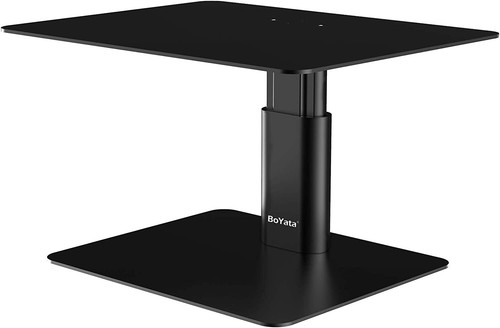
When evaluating monitor stand risers, several key features should guide your decision:- Adjustability: Look for stands that offer height and angle adjustments. Some risers allow for incremental height settings, typically ranging from 3 to 6 inches, which can accommodate a variety of desk setups and user preferences.
- Weight Capacity: Ensure the riser can support the weight of your monitor. Most standard risers can handle between 20 to 50 pounds, but it’s crucial to verify this against the weight of your device.
- Material and Build Quality: Common materials include plastic, metal, and wood. Metal and wood options often provide superior durability and stability. Consider the finish as well — a smooth, non-slip surface can prevent your monitor from sliding.
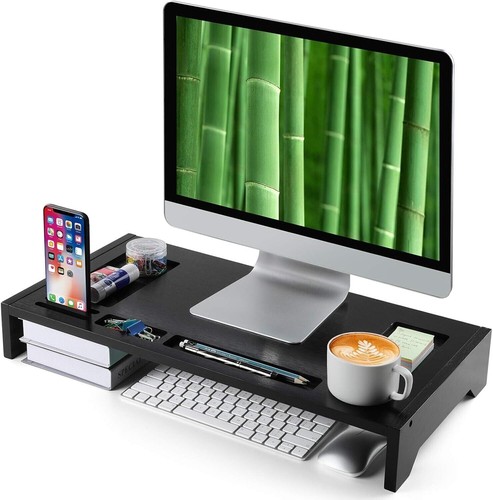
- Additional Features: Some stands come with built-in cable management systems or additional shelving for accessories, which can help keep your workspace organized.
Comparing Monitor Stand Riser Options
Let’s break down the decision criteria into practical categories to help you find the best fit for your needs:| Category | Best For | Features | Considerations |
|---|---|---|---|
| Adjustable Height | Users needing precise height control | Height range: 3-6 inches, multi-tier design | May require manual adjustment |
| Fixed Height | Simpler setups with consistent use | Standard height: 4 inches, solid build | Less flexibility in positioning |
| Integrated Storage | Cluttered workspaces | Drawers, shelves, cable management | Can occupy more desk space |
| Eco-Friendly Materials | Environmentally conscious users | Sustainable wood, recycled materials | Potentially higher cost |
Common Mistakes to Avoid When Choosing a Monitor Stand Riser
One frequent mistake is neglecting the weight capacity of the stand. Ensure that your chosen riser can comfortably support the weight of your monitor, especially if you have a larger, heavier model. Another common oversight is ignoring the compatibility with dual or multiple monitor setups. If you plan to expand your workstation, ensure that the riser can accommodate additional screens.Shopping new with fast Prime shipping? Amazon usually has the best stock.
Compare Options on Amazon →FAQs About Monitor Stand Risers
How do I determine the right height for my monitor stand riser?
Measure the distance from your desk to your eye level while sitting comfortably. The top of your monitor should align with your eye level, which often translates to a riser height between 3 to 6 inches.
Are there monitor stand risers suitable for dual monitors?
Yes, some risers are designed to accommodate multiple monitors. Look for wider platforms or modular designs that allow for easy expansion.
Can a monitor stand riser help with neck and back pain?
Yes, by elevating your monitor to the correct height, a riser can help maintain proper posture, reducing the strain on your neck and back over time.
What materials are best for monitor stand risers?
Metal and wood are popular for their durability and stability. Plastic options can be lighter and more affordable but may not offer the same level of sturdiness.
Is it worth investing in a riser with additional storage?
If desk space is a concern, risers with built-in storage can be beneficial. They help keep your workspace organized by providing designated spots for accessories and cables.
How do I maintain and clean my monitor stand riser?
Regular dusting and occasional wiping with a damp cloth can keep your riser looking new. Avoid harsh chemicals that might damage the finish.
Choosing the Right Monitor Stand Riser for Your Needs
Ultimately, the best monitor stand riser should fit seamlessly into your workspace while providing the ergonomic benefits you need. Consider your specific requirements, such as adjustability and additional features, to find a riser that enhances both comfort and productivity. By investing in a well-chosen monitor stand, you can create a healthier, more efficient work environment. Compare today’s dealsCurrent deals on eBay
Live prices · used & refurbished often lower.

Related Guides