10 min read
Disclosure: As an Amazon Associate and eBay Partner Network publisher, we earn from qualifying purchases. This doesn’t affect what we recommend or how we describe it.
Most guides treat smart sleep masks with Bluetooth as a simple gadget upgrade—just add wireless audio, and you’re set. That’s a mistake. The reality is, these devices live at the intersection of sleep science, wearable comfort, and audio tech. The right choice isn’t just about streaming music or blocking light; it’s about how well the mask fits your face, whether the Bluetooth module is comfortable all night, and if the audio features actually help you sleep instead of causing more problems. The details—battery life, material breathability, sound leakage, EMF emissions, and even the placement of speakers—matter more than most buyers realize. Here’s what you need to know before you buy, and how to avoid the most common pitfalls.
What most buying guides get wrong about Bluetooth sleep masks
The average roundup glosses over two things: first, how the physical design interacts with actual sleep positions; second, the limitations of Bluetooth audio for overnight use. Not all “smart” masks are equal—some prioritize audio quality but are bulky or uncomfortable for side sleepers, while others nail comfort but compromise on sound clarity. And “Bluetooth” doesn’t mean much unless you know the version, signal range, and whether you can control playback without reaching for your phone at 3 a.m.
You’ll also see wild claims about sleep enhancement features: built-in white noise, smart alarms, and even “sleep tracking.” The truth? Sleep tracking in masks is rarely accurate compared to medical-grade polysomnography, and most audio features boil down to simple playback of your own playlists or apps. The real differentiators are comfort, battery life, and whether the mask actually blocks light without overheating your face.
How the main types of smart sleep masks with Bluetooth compare
| Type | Best For | Speaker Placement | Battery Life | Bluetooth Version | Price |
|---|---|---|---|---|---|
| Flat-panel design | Back sleepers, minimal bulk | Directly over ears | 8–10 hrs | 5.0/5.2 | $ |
| Padded, contoured mask | Side sleepers, light blocking | Inset, foam-cushioned | 10–15 hrs | 5.0 | $$ |
| Full-coverage smart mask | Light-sensitive, longest wear | Fully embedded, adjustable | 15–20 hrs | 5.2 | $$$ |
| Ultra-light travel model | Frequent flyers, compact packing | Thinner, lower-profile | 6–8 hrs | 4.2/5.0 | $ |
| Biofeedback-integrated | Tech enthusiasts, sleep experimenters | Variable (often removable) | 5–7 hrs (w/ sensors active) | 5.0/5.2 | $$$ |
Price tiers ($/$$/$$$) read across this comparison only — they mark each product’s relative position from cheapest to priciest in the set. Actual prices live below.
Related Guides
- Aromatherapy Diffusers for Better Sleep: Our Top Recommendations
- Bluetooth Blood Glucose Meters: A Practical Buyer’s Guide
- Our guide to Smart Inhalers for Asthma: Which Devices Are Worth Considering?
- Top Sleep Apnea Mouthpieces That Actually Work
- Our guide to Adjustable Bed vs Wedge Pillow: Which Is Better for Better Sleep?
- Smart Ring vs Fitness Band: Which Wearable Is Right for You?
The spec almost nobody talks about: speaker thickness and comfort
Audio quality gets all the attention, but in practical use, the thickness of the built-in speakers can make or break a Bluetooth sleep mask. Most models use ultra-thin drivers—typically 3–5mm thick—embedded in foam or fabric. However, even a few extra millimeters can create uncomfortable pressure on the ears, especially for side sleepers. Contoured masks with recessed speaker chambers generally offer the best compromise: they keep the speakers off direct ear contact, reducing soreness after hours of use.
Another overlooked factor is adjustability. Some masks allow you to reposition the speakers within their channels, which is essential if your ear placement doesn’t match the mask’s default. This isn’t just a comfort issue; it’s about getting consistent audio volume in both ears—critical for white noise or binaural beats. If you can’t adjust the placement, you risk “dead spots” or muffled sound, which defeats the purpose of the mask altogether.
Why battery life claims can be misleading
Manufacturers love to tout “all-night battery life,” but the numbers often assume continuous playback at low volumes, with all extra features switched off. In practice, battery life depends on three things: your preferred volume (higher drains faster), whether you use extra features like timers or alarms, and the Bluetooth version. Bluetooth 5.0 and 5.2 are significantly more efficient than 4.2, but the real-world difference between 10 and 15 hours may not matter unless you frequently nap with the mask during the day as well.
For most users, a mask that reliably delivers 8–10 hours at moderate volume is sufficient for overnight use. If you need longer (for long-haul travel or back-to-back naps), look for options with at least a 200mAh battery—these typically advertise 15+ hours. Fast charging is another plus: USB-C charging can cut full recharge times to around 1.5–2 hours, compared to 3+ hours for older micro-USB models.
Material science: the real link between comfort and sleep quality
It’s tempting to focus on features, but the material of the mask is what determines if you’ll actually use it every night. Look for masks with a high percentage of breathable fabrics—ideally 60% or more bamboo viscose, modal, or perforated foam. Synthetic fabrics like polyester can trap heat and sweat, leading to discomfort and breakouts. A mask that claims “memory foam” but uses a dense, non-perforated slab will feel hot and stiff after an hour.
Strap design matters too. Wide, adjustable Velcro straps (at least 3cm wide) distribute pressure better than thin elastic bands. Some premium options use a split-strap design to avoid tangling hair or pulling on the scalp. If you’re sensitive to pressure or prone to headaches, avoid masks with rigid Bluetooth modules positioned at the back of the head—these can dig in during the night, especially for back sleepers.
Audio features that matter—and those that don’t
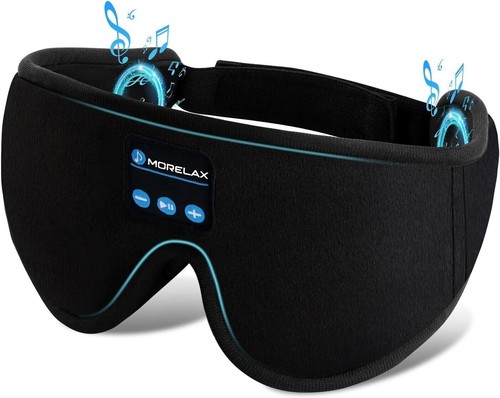
Nearly all Bluetooth sleep masks stream any audio your phone or tablet can play: music, podcasts, white noise, meditation tracks. The difference is in onboard controls. Look for masks with tactile (not touch-sensitive) buttons for play/pause, skip, and volume—ideally raised so you can find them by feel. Some models add a basic sleep timer (30–120 minutes); this is genuinely useful for those who don’t want audio all night. “Smart” features like auto-fade or alarm vibration are rare and often unreliable at this price tier.
Microphone support (for calls) is almost always poor, with muffled pickup and little real-world utility. If you need to answer calls hands-free, you’ll get better results with a dedicated headset. And don’t be swayed by claims of “3D audio” or “HD sound”—the drivers in most masks are limited by their thinness and proximity to the ear. Expect clear enough sound for sleep audio, but not audiophile-level quality.
For more on sleep and noise, the Sleep Foundation offers evidence-based guidance on noise and sleep quality.
EMF exposure, safety, and what the research actually says
A common concern with Bluetooth sleep masks is electromagnetic field (EMF) exposure. Bluetooth operates at low power (typically under 10mW), and current research suggests that EMF levels from wearable devices are far below international safety limits. According to the International Telecommunication Union, Bluetooth’s SAR (specific absorption rate) is much lower than that of mobile phones. For most healthy adults, the risk is negligible. If you’re still concerned, choose a mask with a manual power-off switch so you can disable Bluetooth once your audio is playing (some masks continue playback from internal storage or preloaded tracks).
Beginner’s pre-purchase checklist
- Measure your head circumference at eyebrow level in centimeters—mask fit varies widely by design.
- Test your preferred sleep position (side, back, stomach) and note if ear pressure is an issue with existing headphones or masks.
- Check your device’s Bluetooth version—older phones/tablets may not support Bluetooth 5.0+ features.
- Decide if you need a sleep timer or onboard controls (for pausing/skipping without your phone).
- Confirm charging port type (USB-C vs micro-USB) for compatibility with your current cables.
- Assess your sensitivity to synthetic fabrics—choose natural fibers if you tend to overheat at night.
- Consider your average nightly audio duration to estimate if you need >10 hours of battery life.
Common mistakes first-time buyers make with Bluetooth sleep masks
Many buyers underestimate the importance of fit: a mask that shifts during the night can leak light or muffle sound, defeating both main purposes. Another mistake is assuming all masks are washable—many have non-removable electronic components, making hand-spot cleaning your only option. If you sweat heavily or wear skincare at night, look for masks with removable, washable covers. Finally, don’t ignore warranty terms: some budget models have no meaningful support, while mid-range and premium picks may offer 12–24 month coverage for electronics failure—a real consideration for nightly-use devices.
FAQ: Smart sleep masks with Bluetooth
How long do Bluetooth sleep mask batteries actually last on a single charge?
Most Bluetooth sleep masks deliver 8–15 hours of playback on a full charge, depending on volume and feature use. Premium models with larger batteries can reach 20 hours, but this is measured at moderate volume without extra features like alarms or sensors running. For all-night use, aim for at least 8 hours at your preferred volume.
Is there a difference between flat and contoured Bluetooth sleep masks?
Yes—the main difference is in comfort and light blocking. Flat masks are lighter and suit back sleepers, but can press on the eyes and ears. Contoured masks use molded foam to create space around the eyes and often recess the speakers, making them more comfortable for side sleepers and better at blocking light leakage.
Can you wash a smart sleep mask with built-in Bluetooth?
Most masks with built-in electronics are not machine washable. Some designs let you remove the Bluetooth module and speakers for hand washing the fabric shell, but many require spot cleaning only. Always check the manufacturer’s care instructions, as water damage is a leading cause of early failure.
Does Bluetooth 5.0 make a real difference over 4.2 for sleep masks?
Bluetooth 5.0 and above offer longer range, more stable connections, and better battery efficiency compared to 4.2. For sleep masks, this usually means less audio dropout and slightly longer battery life. However, if your phone or tablet only supports 4.2, you won’t benefit from the newer standard.
Are Bluetooth sleep masks safe to wear all night?
For most healthy adults, Bluetooth sleep masks are safe for overnight use. The EMF exposure is extremely low, and the main safety concern is physical comfort—poorly designed masks can cause ear or scalp soreness. If you have any pre-existing skin conditions or are sensitive to pressure, choose a mask with breathable, hypoallergenic materials and a well-padded design.
Bluetooth sleep mask vs. regular sleep mask with headphones—which is better for sleep?
Bluetooth sleep masks integrate audio and light blocking in one device, reducing bulk and tangling compared to wearing a separate mask and headphones. However, standalone headphones may offer better sound quality, and regular masks are usually easier to wash. For most people who want audio without extra devices, a well-designed Bluetooth sleep mask is the more convenient option.
What should I do if my mask’s Bluetooth won’t connect?
First, make sure the mask is fully charged and in pairing mode. Remove previous Bluetooth connections from your device’s settings, then retry pairing. If problems persist, check if your phone/tablet supports the mask’s Bluetooth version. Persistent issues may indicate a defective module—review the return policy before purchasing.
So—are smart sleep masks with Bluetooth worth it?
If you rely on audio to fall asleep or need blackout-level light blocking, a Bluetooth-equipped sleep mask can be a game-changer. The best options balance comfort, battery life, and audio control—don’t settle for the cheapest model if you’re a side sleeper or sensitive to heat. Focus on fit, fabric, and battery specs over flashy features, and you’ll avoid the most common frustrations. For those ready to upgrade, check current prices on the most comfortable, user-friendly options—or view options that best match your sleep style.



Last updated: July 2026 · Our editorial process