9 min read
Disclosure: As an Amazon Associate and eBay Partner Network publisher, we earn from qualifying purchases. This doesn’t affect what we recommend or how we describe it.
Parents who want to monitor their children’s ear health between doctor visits, adults managing recurring earwax issues, and tech enthusiasts interested in visualising ear canal conditions all turn to digital otoscopes for home use. Each group brings a different priority: ease of use, image clarity, or advanced connectivity. Yet, what matters most for everyone is safety and accuracy—after all, you’re looking inside your own (or your child’s) ear canal, an area that demands precision and care.
What matters most when choosing a digital otoscope for home use?
All digital otoscopes promise a peek inside the ear, but not all deliver a safe or useful experience. The single most important factor isn’t maximum magnification or the number of bundled accessories—it’s whether the device offers a clear, well-lit image at a safe insertion depth, with a design that prevents accidental over-insertion. Most home users need a field of view between 70-120°, a camera resolution of at least 720p (1280×720 pixels), and a probe diameter of 3.5-4.5mm for adult and child ears. Anything narrower increases risk of breakage or discomfort; anything wider may not fit comfortably.
Lighting matters just as much. Look for at least 4-6 integrated LEDs with adjustable brightness. Too little light, and you won’t see; too much, and glare or washout can obscure detail. A built-in temperature sensor is a bonus for comfort, but not essential. WiFi or USB connectivity is a matter of preference, but make sure the app or viewing software is compatible with your devices (iOS, Android, Windows, Mac).
How the main digital otoscope types compare
| Type | Camera Resolution | Probe Diameter | Connectivity | Battery Life | Price |
|---|---|---|---|---|---|
| WiFi app-based | 1080p (1920×1080) | 3.9mm | WiFi to phone/tablet | 60-90 min per charge | $$ |
| USB direct-connect | 720p (1280×720) | 4.3mm | USB (PC/laptop/Android) | Draws from device | $ |
| Integrated screen | 720p (1280×720) | 4.5mm | Built-in display | 120 min per charge | $$$ |
| Child-safe soft-tip | 720p (1280×720) | 3.5mm (soft silicone) | WiFi to phone/tablet | 45-60 min per charge | $$ |
| Dual-use (ear/nose/skin) | 1080p (1920×1080) | 4.3mm (with tip adapters) | WiFi & USB | 90 min per charge | $$$ |
Does higher resolution actually help you see more?
On paper, a 1080p camera looks vastly superior to 720p. In practice, most ear canal inspection is limited as much by lighting, focus, and hand steadiness as by raw pixel count. A well-designed 720p otoscope with a true optical focus lens and six adjustable LEDs will outperform a cheap 1080p device with fixed focus or poor lighting. For home use, anything below 720p tends to produce blurry, unusable images. If you want to save clear photos or video to share with a healthcare provider, 1080p is a nice-to-have, but not a must. More important: check for true optical resolution, not just digital upscaling.
Who should buy each otoscope type?
WiFi app-based models are ideal if you want to use your phone or tablet as a display, value portability, and prefer wireless operation. USB direct-connect models work best for users who want plug-and-play reliability with a laptop or desktop, and don’t mind being tethered. Integrated screen otoscopes are the simplest to operate—no app installation or wireless pairing—but are bulkier and pricier.
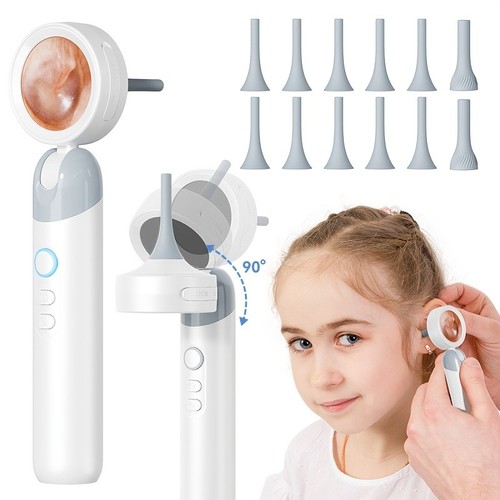
Child-safe soft-tip otoscopes are best for parents inspecting young children’s ears. These include flexible silicone tips and sometimes a built-in depth guard, reducing the risk of accidental injury. Dual-use models (with interchangeable tips for ear, nose, or skin) suit buyers who want to maximise value and versatility, but keep in mind that wider tips may not be suitable for very narrow ear canals.
Compare today’s dealsWhat safety features actually reduce risk?
Any device you insert into the ear canal must prioritise safety. Look for a probe with a physical depth guard—some models use a flared collar or ring 15-18mm from the tip to prevent over-insertion. Soft silicone tips are gentler, especially for children, but can be harder to clean. Replaceable tips are a must for hygiene if you’re inspecting multiple family members. Devices with auto-shutoff if the probe gets too hot (over 40°C) add a layer of protection, though overheating is rare in modern designs.
Do not rely on magnification alone to guide insertion. The best digital otoscopes include on-screen alignment guides or markings to help you orient the image and avoid pushing too far. If you have a known history of ear drum perforation, chronic infections, or ear tube placement, consult a healthcare provider before using any home otoscope. For more on safe home use of medical devices, see FDA medical devices.
App connectivity: headaches and hidden limitations
WiFi otoscopes connect by broadcasting their own wireless network, which you join from your phone or tablet. This disables your usual internet connection during use—a minor annoyance, but worth knowing. Not all apps are equally reliable; check that the otoscope’s app is updated for your operating system, especially if you’re using recent versions of iOS or Android. Some models only support live viewing, while others allow you to capture photos and video, or even share them securely with a healthcare provider.
USB models are more straightforward: plug into a compatible device, launch the supplied software, and view the live feed. However, many USB otoscopes do not support iPhones or iPads, as Apple restricts direct USB video input. Integrated-screen otoscopes bypass these issues entirely, but you can’t easily save or share images. If remote sharing is a priority, favour a WiFi or USB model with recording capability.
See what’s availableAccessories and what actually matters
Most digital otoscopes for home use ship with a set of disposable or reusable tips (specula), cleaning tools, and sometimes a carrying case. The number of tips varies—basic models may include 4-6, while premium kits offer 12 or more. Make sure the tips are easy to remove and disinfect. If you plan to use the otoscope for more than one person, prioritize models with extra tips and check if replacements are readily available. Some kits include earwax removal tools, but these should be used with extreme caution and never inserted deeply into the ear canal.
Other accessories—like ear canal cleaning solution bottles, microfiber lens cloths, or smartphone stands—are nice extras but not essential. Focus on core usability and hygiene first.
Check current pricesRelated Guides
- Our guide to Digital Otoscopes for Home Use: A Practical Buyer’s Guide
- Air Purifiers vs Humidifiers: Which One Does Your Home Really Need?
- Digital vs Analog Stethoscopes: Which Is Right for You?
- Our guide to Red Light Therapy Panels for Home Use: What to Know Before You Buy
- Acupressure Mats Worth Trying for Home Wellness
- Our guide to Digital Stethoscopes, Reviewed and Compared
Total cost of ownership
The sticker price of a digital otoscope is only part of the equation. Here’s what to budget for over the first year of regular home use:
- Replacement tips/specula: Expect to replace tips every 2-3 months if used by multiple people, or immediately if visibly soiled or damaged. A 10-pack typically costs a moderate sum; annual estimate: $10-$20.
- Cleaning supplies: Alcohol wipes or disinfectant for cleaning tips and probe are a recurring cost, especially for family use. Annual estimate: $5-$10.
- Battery or charging cable replacement: Integrated rechargeable batteries usually last 1-2 years. If your model uses replaceable batteries or proprietary charging cables, factor in occasional replacements. Annual estimate: $5-$15.
- App or software upgrades: Most home otoscopes include free apps, but a few charge for advanced features (like cloud storage or telehealth sharing). Annual estimate: $0-$15, depending on your needs.
- Accessory loss/breakage: Small ear picks, lens covers, or adapters can go missing or break. Replacements are inexpensive but can add up: $5-$10 per year.
Overall, you’ll spend an extra $20-$50 a year beyond the initial purchase, depending on family size and usage frequency.
Common mistakes and how to avoid them
Many first-time users push the otoscope too far into the ear canal, risking discomfort or even injury. Always use the supplied depth guard or soft-tip attachment, and stop if you feel resistance. Another common error is using the device without cleaning the tip between uses, which increases infection risk. Make it a habit to disinfect after every session. Fumbling with app setup or WiFi pairing can frustrate new users—read the quick start guide before your first use, and test the connection before inserting the probe.
Finally, don’t over-interpret what you see. Even with a clear image, distinguishing between normal earwax, inflammation, or infection is not always straightforward. When in doubt, capture a photo and consult a healthcare provider rather than self-diagnosing. For clinical guidance on ear health and safe device use, see American Academy of Audiology.
Frequently asked questions about digital otoscopes for home use
How often should I replace the otoscope tips?
Replace disposable tips after each use, especially if the device is shared among family members. For reusable tips, disinfect thoroughly after every session and replace them every 2-3 months or sooner if they show signs of wear or staining.
Are WiFi otoscopes safe for children?
WiFi otoscopes can be safe for children if they feature a soft-tip design and a depth guard. Always supervise use, and never insert the probe deeply. For very young children or infants, consult a healthcare provider before home inspection.
What’s the difference between 720p and 1080p resolution in practice?
1080p provides a sharper, more detailed image, which can be helpful for spotting subtle issues or sharing photos with a clinician. However, a well-designed 720p otoscope with good optics and lighting is usually sufficient for basic home monitoring and is often more affordable.
How long does the battery last on a typical digital otoscope?
Most rechargeable digital otoscopes deliver 45 to 120 minutes of continuous use per charge, depending on model and LED brightness settings. For occasional home checks, this translates to several weeks between charges for most users.
USB vs WiFi otoscopes — which is better for sharing images with a doctor?
WiFi otoscopes are generally better for sharing images, as their companion apps often allow you to save and send photos or videos directly from your phone or tablet. USB models can also save images, but sharing may require transferring files from a laptop or PC, adding an extra step.
What warranty or support should I expect?
Most mid-range and premium digital otoscopes come with a 1-year limited warranty covering manufacturing defects. Support quality varies—some brands offer live chat or email support, while others provide only basic documentation. Always check return policies and warranty terms before purchasing.
Final recommendation: which otoscope profile fits most home users?
For most people, a WiFi app-based digital otoscope with a 3.9-4.3mm probe, 720p or better resolution, 6 LEDs, and replaceable tips strikes the best balance of usability, safety, and image quality. Parents of young children should consider a child-safe model with a soft tip and depth guard. If you want a zero-fuss experience and don’t need to save images, an integrated screen model is worth the extra investment. Prioritise safety features and reliable connectivity over raw specs, and you’ll end up with a tool that genuinely helps you monitor ear health at home—without adding risk or frustration.


Last updated: June 2026 · About our research