Disclosure: As an Amazon Associate and eBay Partner Network publisher, we earn from qualifying purchases. This doesn’t affect what we recommend or how we describe it.
10 min read
Carpal tunnel syndrome affects up to 5% of adults, but wrist pain, finger numbness, and forearm fatigue are even more common among anyone who spends hours at a computer. The single most overlooked factor? The shape and angle of your mouse. Most standard mice force your wrist and forearm into a twisted, palm-down posture that ramps up strain over time. An ergonomic mouse promises a more natural hand position, but not all designs — or features — actually deliver. Here’s what you need to know before you swap out your current mouse for one that claims to be “ergonomic.” For more detail, see Carpal tunnel syndrome overview.
Why Most Mice Cause Problems — And What Ergonomic Variants Try to Fix
Traditional mice are designed for precision, not joint health. They keep your forearm pronated (palm down), which puts compressive force on the median nerve and stresses the extensor tendons. Over weeks or months, this can lead to symptoms like tingling, aching, or even loss of grip strength. Ergonomic mice attempt to solve this by changing the angle or grip style, reducing the torque on your wrist and fingers. But designs vary wildly — from vertical mice that mimic a handshake, to trackballs that eliminate wrist movement, to contoured horizontal shapes that support the palm and fingers. For more detail, see NIOSH ergonomics guidance.
Looking for the current generation with manufacturer warranty intact? Amazon’s new stock is the safest bet.
Shop Ergonomic Mice →How the Main Ergonomic Mouse Types Compare
Not all ergonomic mice serve the same needs. Here’s a detailed comparison of the main buying profiles, focusing on what actually changes for your hand, wrist, and workflow.
| Profile | Hand/Wrist Angle | Movement Required | Size Range | Button Customization | Battery/Power | Who It’s Best For |
|---|---|---|---|---|---|---|
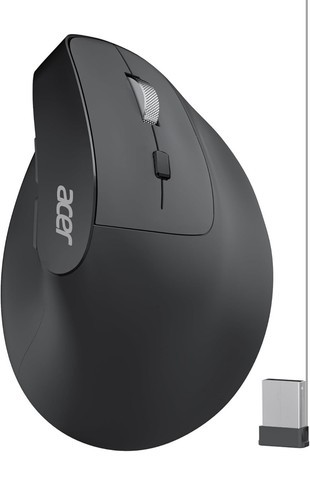
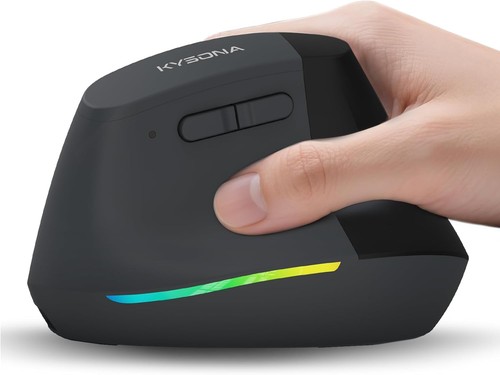
| The vertical grip choice | Hand at 57–90° (near handshake) | Forearm movement minimized, small wrist rotations | Medium to XL (palm length 17–22cm) | 4–8 programmable buttons | Rechargeable (2–3 months/charge) or AA/AAA (6–12 months) | Wrist/forearm pain, carpal tunnel risk, large hands |
| The stationary trackball option | Neutral (palm-down or slightly angled) | Hand stays stationary, ball moves cursor | Medium to Large (palm length 16–21cm) | 4–10 buttons, often highly customizable | Rechargeable or AA/AAA (up to 18 months) | Shoulder/elbow pain, limited desk space, multi-device users |
| The contoured horizontal pick | 20–35° tilt, supports palm/fingers | Standard wrist/arm movement, less finger tension | Small to XL (palm length 15–22cm) | 2–6 buttons, moderate customization | Rechargeable (1–2 months) or AA/AAA | General discomfort, smaller hands, those switching from standard mouse |
| The pen-style design | Hand upright, fingers grip like a pen | Fine finger/wrist movement, no palm contact | One size fits most | 1–2 buttons, basic | Rechargeable (weeks per charge) | Artists, touchscreen users, those with finger/knuckle pain |
What Actually Changes for Your Body With Each Design
The angle of your wrist and the way you move your arm matter more than button count or DPI. Vertical mice typically set your hand at a 60–80° angle, so your thumb is on top and your pinky is on the desk — like a handshake. This reduces pronation, but can feel awkward at first, especially if you have smaller hands or need rapid cursor movements. Trackballs eliminate repetitive wrist movement entirely, which is a game-changer for users with elbow or shoulder pain, but require thumb or finger dexterity and a willingness to learn a new motion.
Contoured mice with a gentle tilt (20–35°) are more familiar for most users, but offer less dramatic relief for severe wrist or nerve issues. Pen-style mice are niche: they excel for drawing or handwriting, but rarely suit all-day office work. No ergonomic mouse can fix posture problems from poor desk height or arm support, but the right shape can substantially decrease pain and fatigue over months of use.
How to Measure Your Hand for a Proper Fit
The best ergonomic mouse for you depends on your actual palm length and width — not just “small,” “medium,” or “large” labels. Measure from the base of your palm (where it meets your wrist) to the tip of your middle finger. Most vertical and contoured mice specify a fit range, e.g. 16–18cm for small, 18–20cm for medium, 20–22cm for large. If your hand falls between sizes, prioritize palm support over finger reach — a mouse that’s too small can make you “claw” your fingers, negating ergonomic gains.
Grip style also matters. If you naturally use a “palm grip” (hand flat), look for a mouse that supports your whole palm and keeps your fingers relaxed. If you prefer a “claw” or “fingertip” grip, you may do better with a lighter, shorter mouse or even a trackball.
Common Mistakes When Switching to an Ergonomic Mouse
Don’t expect instant comfort. It’s normal to feel awkward for the first few days or even weeks as your muscles adjust to a new grip angle. The most common mistakes:
- Choosing the wrong size: A mouse that’s too large or small increases strain. Measure your hand before buying.
- Ignoring button placement: Some ergonomic mice have side buttons that are hard to reach, especially for smaller hands. Test the button feel if possible.
- Setting DPI too high: Many ergonomic mice default to 1000–1600 DPI, which can feel “jumpy.” Start at 800–1200 DPI for more control.
- Not adjusting your desk setup: Even the best mouse can’t compensate for a desk that’s too high or an unsupported forearm.
- Giving up too soon: Allow at least a week of daily use before deciding if a design works for you.
Related Guides
Wireless vs. Wired: What Really Matters for Ergonomics
Most ergonomic mice now use 2.4GHz wireless or Bluetooth, with battery life ranging from 1–18 months on a single AA/AAA battery, or 2–12 weeks per charge for built-in batteries. For most users, wireless means less desk clutter and no cable drag, which is especially noticeable with vertical and trackball designs. The only exception: if you work in an environment with a lot of wireless interference, a wired option may offer smoother tracking and zero lag. For all-day use, check for a mouse that can be used while charging (via USB cable) — not all rechargeable models allow this.
What to Expect From Button Customization and Software
Many ergonomic mice offer 4–10 programmable buttons, letting you assign shortcuts, copy/paste, or browser controls. On Windows and macOS, most major ergonomic mice support remapping via their own software or third-party tools. Trackball and vertical mice often have thumb or finger buttons that can be hard to reach for smaller hands, so test the ergonomics of button placement, not just the total number. Some models support multi-device switching (often via a button on the bottom), which is valuable if you juggle a laptop and desktop. For left-handed users, true ambidextrous or mirrored designs are rare, so check for left-hand compatibility before purchasing.
See what’s available with different button layouts and hand orientations.
Real-World Comfort: Materials, Weight, and Surface Texture
Most ergonomic mice use ABS plastic shells with rubberized grips for the thumb and pinky. Weight varies from 70g (lightweight, pen-style) to 150g+ (large vertical or trackball models). Heavier mice can reduce “flicky” movements but may fatigue the hand over time. Surface texture is more important than most realize: a matte, slightly textured finish is less likely to cause sweaty palms during long sessions. Some contoured mice include a removable palm rest or adjustable tilt legs — features that can make a big difference if your desk height is less than ideal.
If you work in a hot environment or have a tendency toward sweaty hands, prioritize a mouse with ventilated grips or perforated surfaces. These details are rarely advertised but can make a real difference in all-day comfort.
Compare today’s deals on ergonomic mice with breathable or textured surfaces.
Who Should Consider Trackball or Pen-Style Ergonomic Mice?
Trackballs are a strong fit for users with limited desk space, shoulder or elbow pain, or those who want to minimize repetitive wrist movement. They do have a learning curve: expect 2–3 days of adaptation, especially if you’ve never used one before. Pen-style mice are more niche, best suited for digital artists or users who do a lot of handwriting, annotation, or precision work. They’re not ideal for general web browsing or office tasks, but can be a useful secondary device.
If you have severe wrist pain or a history of carpal tunnel syndrome, a vertical or trackball design is usually more effective than a contoured horizontal mouse. For occasional discomfort or prevention, a contoured design may be enough — and the adjustment period is typically shorter.
Check current prices on vertical, trackball, and pen-style options tailored to your needs.
Looking for the current generation with manufacturer warranty intact? Amazon’s new stock is the safest bet.
Compare Ergonomic Mouse Options →Frequently Asked Questions About Ergonomic Mice
What is the ideal angle for a vertical ergonomic mouse?
Most vertical ergonomic mice set your hand at a 57–90° angle to the desk, mimicking a handshake. Angles between 60–75° are supported by clinical studies as reducing pronation-related strain while still allowing precise control. Larger angles (closer to vertical) may feel awkward for first-time users but offer greater relief for severe wrist issues.
Can an ergonomic mouse prevent carpal tunnel syndrome?
No mouse can guarantee prevention, but ergonomic designs reduce the wrist flexion and nerve compression associated with carpal tunnel syndrome. They are most effective when combined with proper desk height, keyboard placement, and regular breaks. For high-risk users, a vertical or trackball mouse can significantly reduce aggravating movements.
How do I know if a mouse is the right size for my hand?
Measure your palm length from the wrist crease to the tip of your middle finger, then compare to the manufacturer’s fit range. A good ergonomic mouse should support your palm without forcing your fingers to stretch or curl. If your fingers hang off the edge or you have to “claw” to reach buttons, it’s likely too small.
Are wireless ergonomic mice slower or less accurate for work tasks?
Modern wireless ergonomic mice operate at polling rates of 125–1000Hz and DPI settings from 400–3200, making them just as accurate as wired counterparts for office tasks. Latency is typically less than 1ms, which is imperceptible for non-gaming use. For graphics professionals or gamers, ultra-high polling rates (500Hz+) may still be preferable with a wired connection.
How long does it take to adjust to a new ergonomic mouse?
Most users need 3–7 days to fully adapt to a new grip or angle, with vertical and trackball designs requiring the longest adjustment. Muscle soreness or awkwardness is common at first. Stick with the new mouse for at least a week before deciding if it’s right for you.
Is there a left-handed ergonomic mouse option?
True left-handed ergonomic mice exist but are less common. Some vertical and trackball designs are ambidextrous or offer mirrored versions. Check product descriptions for left-hand compatibility, and avoid “universal” claims unless the mouse has a truly symmetrical shape and button layout.
Can I use an ergonomic mouse for gaming?
Some ergonomic mice, especially those with adjustable DPI (up to 3200 or higher) and polling rates of 500Hz or more, can be used for casual gaming. However, vertical and trackball designs may not offer the fast-twitch precision or rapid button access required for competitive gaming genres. If gaming is a priority, look for an ergonomic design that specifically advertises a high DPI range and programmable buttons suited for your preferred games.
What maintenance does an ergonomic mouse require?
Most ergonomic mice only need occasional cleaning with a soft cloth and, for trackball models, removal of the ball for debris cleaning every few weeks. Rechargeable models should be topped up every 2–12 weeks depending on usage, and battery-powered options may need a replacement battery every 6–18 months. Always check for firmware updates if your mouse uses companion software for customization.
The Bottom Line: What Makes an Ergonomic Mouse Worth It?
The right ergonomic mouse can make the difference between nagging wrist pain and pain-free productivity — but only if you match the design to your hand size, grip style, and specific symptoms. Vertical and trackball mice offer the most dramatic relief for repetitive strain, while contoured horizontal options are a solid upgrade for general discomfort. Ignore generic “ergonomic” labels and focus on measurable factors: hand fit, angle, button layout, and movement style. Take the time to adapt, and you’ll likely wonder why you put up with your old mouse for so long.
Related Guides