
Disclosure: As an Amazon Associate and eBay Partner Network publisher, we earn from qualifying purchases. This doesn’t affect what we recommend or how we describe it.
8 min read
Most so-called “ergonomic” office chairs fail at the one thing that actually matters: keeping your body supported and comfortable during hours of desk work. The sticker price or the number of adjustment levers rarely tells you whether a chair will prevent back pain or just look professional on a video call. The most important factor? Whether the chair’s core dimensions and adjustability match your body—because even the most hyped design becomes useless if the seat pan is too deep, the lumbar support hits the wrong spot, or the armrests wobble after a month. For more detail, see OSHA ergonomics guidelines.
Why Chair Sizing and Adjustability Matter More Than ‘Ergonomic’ Marketing
Many office chairs are labeled “ergonomic” without meeting even basic fit criteria. The golden rule: a chair only supports you if its seat height, depth, backrest, and armrests can be adjusted to fit your body—and those adjustments hold up over daily use. A chair that fits a 6’2” user can be miserable for someone 5’3”, and vice versa. Here’s what to look for:
- Seat height: Should adjust from 16″ to at least 21″ off the floor. This range covers most adults, allowing your feet to rest flat and knees to form a 90° angle.
- Seat depth: Adjustable depth (or at least a range of seat sizes) is critical. You need 2–4″ between the seat edge and the back of your knees. Fixed-depth seats often lead to poor circulation or slouching.
- Backrest height: For lumbar support to hit your lower back, look for adjustable backrests or lumbar pads that slide at least 2–4″ vertically.
- Armrest adjustability: Height should range from 7″ to 11″ above the seat. Width and pivot adjustments help align with your shoulders and desk.
Fixed-arm, fixed-back, and non-adjustable chairs may be cheaper, but they almost always force you into awkward postures after an hour or two. The best option is a chair that adapts to you—not the other way around.
Want to browse what’s available? Browse current options →
How the Main Ergonomic Chair Types Compare
There’s no single “best” ergonomic office chair. Instead, the right model depends on your body, your work habits, and your budget. Here’s a breakdown of common categories and how they compare across key criteria:
| Buying Profile | Seat Height Range | Seat Depth Adjustment | Lumbar Support | Armrest Adjustability | Best For | Common Trade-Offs |
|---|---|---|---|---|---|---|
| Full-adjustment, mesh back | 16–21″ | Yes (2–3″ range) | Adjustable height/depth | 4D (height, width, depth, pivot) | All-day use, hot climates | Mesh can sag over years; premium price |
| Mid-range with basic adjustments | 17–20″ | Sometimes fixed | Fixed or basic pad | 2D (height, width) | Occasional use, shared spaces | Limited lumbar targeting; fewer adjustments |
| Task chair for petite users | 15–19″ | Shorter, sometimes fixed | Lower lumbar curve | Height only | Shorter users, compact desks | Not suitable for taller/larger bodies |
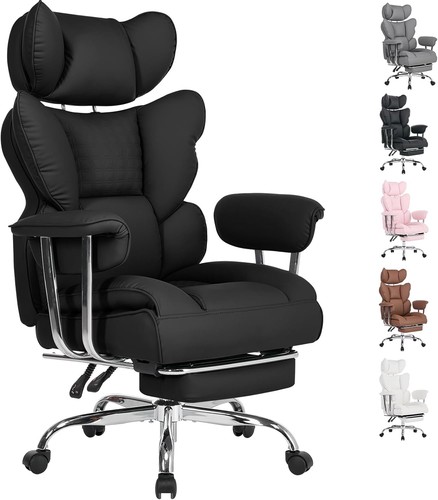
| Executive padded chair | 18–22″ | Usually fixed | Padded, non-adjustable | Fixed or basic height | Short meetings, conference rooms | Gets warm, lacks fine-tuning |
| Kneeling or active-sit option | Varies (usually fixed) | N/A | N/A | N/A | Short bursts, posture training | Not for full-day use; learning curve |
Seat Pan Depth and Why Most Chairs Get It Wrong
The seat pan—the part you sit on—should support most of your thigh without pressing into the back of your knees. Too deep, and you’ll slouch or lose circulation; too shallow, and your thighs are unsupported, leading to pressure points. The ideal seat depth for most adults is 16–19″, but the critical factor is adjustability. Look for a seat that slides forward/back at least 2″ to dial in fit. Most budget chairs are fixed at 18″, which excludes many shorter users and causes discomfort over time.
See what’s availableWhy Lumbar Support Placement, Not Just Padding, Determines Comfort
Many chairs add a “lumbar pillow” or extra padding, but if it doesn’t hit your natural lumbar curve (usually around L3–L5, or 6–10″ above the seat), it’s useless. Adjustable-height lumbar pads or backrests that move up and down are far more effective than fixed supports. For chronic lower back pain, look for chairs with lumbar depth adjustment (allowing the pad to protrude 1–2″ forward). Some designs use a tension knob for fine-tuning, which can make a noticeable difference during long work sessions.
Compare today’s dealsArmrest Adjustments: What’s Essential, What’s Overkill
Armrests should support your forearms without lifting your shoulders or forcing your elbows outward. At minimum, look for height adjustment from 7″ to 11″ above the seat. Width adjustment (letting armrests move in/out by at least 1.5″) helps align with your body. Pivot and depth adjustments (“4D” arms) are valuable if you type for hours or switch between tasks, letting you bring the rests closer for keyboard work or further for mousing. Flimsy or loose armrests are a red flag—test for wobble before you commit.
Mesh vs. Upholstered Seats: Real Differences in Comfort and Durability
Mesh seats and backs allow airflow, which helps in warm environments or for users prone to sweating. Look for mesh rated to withstand at least 100,000 double rubs (an abrasion test) for long-term durability. However, mesh can sag over time—especially in cheaper chairs—leading to less support. Upholstered (foam-padded) seats distribute pressure better for some users, but can trap heat and lose resilience after 2–3 years of daily use. Denser foam (2.5+ lb/ft³) and woven fabrics last longer than basic PU or bonded leather.
What Tilt Mechanisms Actually Do—And Why It Matters
Chair tilt isn’t just about leaning back. A true “synchro-tilt” mechanism lets the seat and back move together at a 2:1 ratio, keeping your feet on the floor and your posture stable. Simple “center tilt” just rocks the whole chair back, which can strain your lower back. For active sitting, look for tilt tension adjustment and lockable recline positions—ideally, at least three lock points between upright and max recline. This lets you shift posture throughout the day, reducing fatigue.
Related Guides
- Which Chair Is More Ergonomic? How to Make the Right Choice
- How Do You Sit Properly in a Partially Reclined Ergonomic Chair?
- Adjustable Foot Stools for Seniors: How to Choose the Right One
- How to Choose a Menstrual Cup: A Practical Guide for First-Time Buyers
- EMS Device vs TENS: Which Should You Choose?
- Browse all Educational Guides →
Common Mistakes: What to Avoid When Shopping for an Ergonomic Office Chair
- Ignoring your dimensions: Many buyers pick a chair based on looks or price, only to find the seat pan is too deep or the lumbar support doesn’t reach their back. Always check adjustment ranges against your height and leg length.
- Assuming price equals comfort: Expensive chairs often add features you may not use—like coat hooks or headrests—while skimping on core adjustments. Focus on fit first, extras second.
- Overlooking build quality: A chair that wobbles or squeaks after a few weeks will sabotage any ergonomic benefit. Look for metal bases, at least a 250 lb weight rating, and smooth, secure adjustment levers.
- Buying without trying (if possible): Even the best-reviewed chair can feel wrong for your body. Whenever possible, test in person or buy from retailers with easy return policies.
Who Should Consider a Non-Standard Chair?
Most users do best with a traditional ergonomic task chair, but there are exceptions. If you have a diagnosed spinal condition (like scoliosis or herniated discs), consult your healthcare provider before selecting a chair—some may benefit from specific backrest shapes or active-sitting designs. Petite users (under 5’4”) often need a seat height that goes lower than standard. Very tall or heavy users (over 6’3” or 250 lb) should look for reinforced frames, longer seat pans, and higher gas lift ratings.
FAQs: Answers to Real Questions About Choosing Ergonomic Office Chairs
How do I know if a chair is truly ergonomic?
Look for at least four key adjustments: seat height, seat depth, lumbar support (height or depth), and armrest height. If a chair lacks any of these, it’s unlikely to fit most users well, regardless of marketing claims.
What seat height is best for a standard desk?
Most desks are 28–30″ high. A seat height of 16–21″ covers the majority of adults, allowing your feet to rest flat and your thighs to be parallel to the floor. Shorter or taller users may need a chair with a wider range or a footrest for optimal comfort.
Is mesh or padded upholstery better for long hours?
Mesh offers better breathability in hot climates and prevents sweat buildup, but can sag over time. Padded seats provide more uniform pressure distribution but can trap heat and lose shape after extended use. Choose based on your climate and sensitivity to pressure points.
Do I really need adjustable armrests?
Yes, if you type for hours or switch between tasks. Adjustable armrests reduce strain on your shoulders and wrists by supporting your arms at the right height and width. Fixed arms can force awkward postures, especially if you share the chair or desk with others.
How important is lumbar support depth adjustment?
Depth adjustment lets you control how much the lumbar pad presses into your lower back. This is especially useful if you have lower back discomfort or want to alternate between upright and reclined postures. Fixed-depth supports are better than nothing, but less customizable.
Can a kneeling or active-sitting chair replace a standard office chair?
Kneeling and active-sitting chairs can encourage better posture and core engagement for short periods but aren’t suitable for all-day use. Most users should use these as a supplement, not a replacement, for a fully adjustable ergonomic chair.
What weight rating should I look for?
Most quality chairs are rated for at least 250 lb. If you are heavier, look for models rated for 300–400 lb to ensure long-term durability and safe support. Exceeding the weight rating can cause premature wear or even structural failure.
The Bottom Line: Fit First, Features Second
No amount of “ergonomic” branding can compensate for a chair that doesn’t fit your body. Start with hard numbers—seat height, depth, lumbar placement—and prioritize models that let you dial in those adjustments. Only after you’ve found a chair that matches your dimensions should you consider extras like headrests, mesh vs. padding, or style. Take the time to compare adjustment ranges, not just features lists, and your back will thank you for years to come.