7 min read
Disclosure: As an Amazon Associate and eBay Partner Network publisher, we earn from qualifying purchases. This doesn’t affect what we recommend or how we describe it.
Most sit stand desk converter buyers assume that “two monitor support” means every model will handle their setup. In reality, the biggest differences come down to work surface width and overall footprint. A dual-monitor-ready converter that’s too compact for your monitors, or too large for your desk, can make the upgrade more hassle than help. The right pick depends on your available space, screens, and how often you actually switch between sitting and standing.
Top picks at a glance
- VIVO Ultra Slim 26″ Desktop Converter — the most compact recognised-brand option
- StarTech Sit-Stand Desk Converter Large 35″ Work Surface — the best option for larger workspaces
Which sit stand desk converter fits your dual-monitor workflow?
Every product on this list is marketed for dual-monitor use, but their approaches are different. One prioritizes minimum footprint, the other maximum workspace. Here’s what sets them apart and what to expect from each.
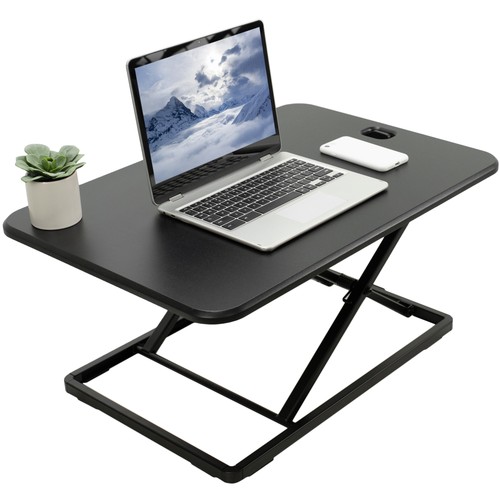
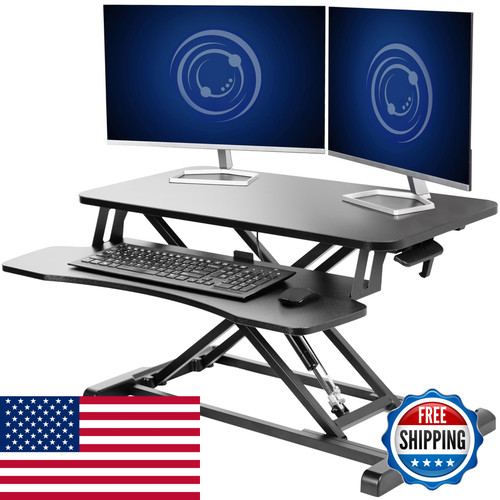
Pictured: VIVO Ultra Slim
| Product | Condition | Price | Best For | Work Surface Width | Footprint Depth |
|---|---|---|---|---|---|
| VIVO Ultra Slim 26″ Desktop Converter |
New | $ | Smallest dual-monitor setup | 26 inches | ~18 inches |
 StarTech Sit-Stand Desk Converter Large 35″ Work Surface StarTech Sit-Stand Desk Converter Large 35″ Work Surface |
New | $$$ | Spacious or deep desks, wider monitors | 35 inches | ~24 inches |
The price column compares within this guide: $ is the budget end, $$ mid, $$$ premium. For exact, up-to-date prices, see the live listings lower in the article.
Desk depth and workspace: the real constraint
Dual-monitor converters aren’t just about total width. The depth of your desk and the converter’s footprint often matter more. The VIVO Ultra Slim keeps things compact, with a 26-inch wide surface and a depth around 18 inches. This fits most standard desks (24-30 inches deep), but leaves less room in front of your monitors for writing or accessories. If your screens are 22 inches or smaller, side by side, you’ll probably fit both without overhanging the edges. Larger or curved monitors may feel cramped.
The StarTech Sit-Stand Converter is a different animal. At 35 inches wide and about 24 inches deep, it’s one of the largest converters you’ll find. You can easily fit two 24-inch monitors with room to spare, and the extra depth means more usable workspace for keyboards, notepads, or a docking station. The tradeoff: you need a desk at least 26 inches deep, and the converter itself is heavier and more imposing.
Monitor size and mounting flexibility
Neither converter includes a built-in monitor arm, so your screens sit directly on the top surface. The VIVO Ultra Slim’s 26-inch width is the hard limit; two large monitors (24-inch or bigger) will hang over the sides. If you use ultra-thin bezels or smaller displays, this is less of an issue.
With the StarTech Sit-Stand Converter, you can fit a pair of 27-inch monitors side by side, though anything larger or with thick frames may still crowd the edges. If you want to use monitor arms, check your desk’s overhang and the converter’s rear design—most converters are not designed for clamping monitor arms directly to their surfaces. For most users, the included surface is the mounting point.
Height adjustment: range and ergonomics
Both models offer manual height adjustment, but their ranges differ. The VIVO Ultra Slim typically adjusts from about 2 inches (sitting) up to roughly 16 inches above the desk in standing mode. That’s suitable for users up to about 6’1” at a standard 29-30 inch desk. The StarTech Sit-Stand Converter, with its larger frame, usually offers a higher maximum—up to 20 inches above desk level. This extra range is valuable if you’re tall or if your monitors need to sit higher for proper ergonomic alignment.
For more on healthy workstation setup and standing desk ergonomics, the U.S. Occupational Safety and Health Administration (OSHA) provides detailed guidance on monitor height, keyboard placement, and safe adjustment practices.
Setup and portability: size tradeoffs
Compact converters like the VIVO Ultra Slim are lighter (typically under 20 lbs) and easier to move or reposition. If you plan to clear your desk regularly or share the converter between locations, this is a real benefit. The StarTech Sit-Stand Converter, on the other hand, weighs significantly more (often 35+ lbs) and is designed for semi-permanent placement. Its size means it’s best for dedicated workstations, not shared or portable setups.
Related Guides
How we selected and compared these dual-monitor converters
Only models specifically listed for dual-monitor setups, with published work surface dimensions and brand reputation, made this shortlist. The most critical criteria were:
- Work surface width (minimum 26 inches for dual monitors)
- Surface depth (to ensure keyboard, mouse, and accessory space)
- Height adjustment range (for ergonomic flexibility)
- Footprint compatibility with common desk sizes (24-30 inches deep)
- Brand support and warranty availability
We compared the listed specs, manufacturer details, and positioning of each option. Unbranded listings, units with unclear work surface sizes, and bundles that included unrelated accessories were excluded. Models that only fit single monitors, or that lack clear adjustment specs, were also filtered out.
This buying guide is for people who already have a desk and want to upgrade to a sit-stand option without replacing their entire workstation. If your desk is unusually shallow (under 24 inches), or you use three or more monitors, neither of these products is likely to fit your needs. In that case, a full standing desk or a wall-mounted arm may be a better fit.
Beginner’s pre-purchase checklist
- Measure your desk’s depth and width in inches—verify that the converter’s footprint will fit with at least 1-2 inches of clearance on all sides.
- Check the width of your two monitors side by side, including bezels—compare to the converter’s listed work surface width.
- Confirm your desired standing height; measure from the desktop to your standing elbow height and verify the converter’s maximum adjustment meets or exceeds this.
- Weigh your monitors—ensure their combined weight does not exceed the converter’s stated load capacity (typically 20-33 lbs for this class).
- Plan cable management in advance; tight layouts may require longer cables or right-angle adapters for neat routing.
- Assess whether you need space for a laptop, tablet, or writing area—larger converters offer more flexibility.
Frequently asked questions about sit stand desk converters for 2 monitors
Will both of these converters fit two 24-inch monitors without overhang?
The StarTech Sit-Stand Converter’s 35-inch width comfortably fits two 24-inch monitors side by side with minimal overhang. The VIVO Ultra Slim’s 26-inch width is much tighter; two 24-inch monitors will likely hang over the edges by 1-2 inches each, depending on bezel size. For truly flush alignment, measure your monitors’ combined width before deciding.
How much assembly is required for these converters?
Both the VIVO Ultra Slim and StarTech Sit-Stand Converter usually arrive mostly assembled. Expect to attach the keyboard tray (if included) and possibly install a few screws or brackets. Setup generally takes under 20 minutes and requires only basic hand tools. Always check the included instructions for specifics.
Which converter is easier to move between rooms or desks?
The VIVO Ultra Slim is significantly lighter (under 20 lbs) and easier to carry or reposition. The StarTech Sit-Stand Converter, at over 35 lbs and with a larger footprint, is less portable and best suited for a permanent desk setup. If you need to move your converter regularly, the VIVO model is the better fit.
What’s the typical lifespan of a sit stand desk converter?
With regular daily use, and assuming the manufacturer’s load limits are observed, sit stand desk converters can last 5 years or more. The main factors affecting longevity are the lift mechanism (spring or pneumatic), the frequency of height changes, and overall build quality. Reputable brands often offer at least a one-year warranty.
Is the price difference between these two models justified?
The StarTech Sit-Stand Converter costs more, but offers a much larger work surface and greater height range. If you need extra space for large monitors, a laptop, or paperwork, the premium is justified. If your space and screens are modest, the VIVO Ultra Slim delivers similar functionality at a lower price point.
Can I clamp a monitor arm to these converters?
Most sit stand desk converters, including these two, are not designed to support monitor arms clamped directly to their surfaces. The weight and leverage can destabilize the platform. If you need arms, consider mounting them directly to your desk, behind the converter, and ensure you have enough depth for both setups.
Are there health benefits to using a sit stand converter?
Alternating between sitting and standing can help reduce sedentary time and may improve comfort for some people. However, standing all day isn’t recommended either. For evidence-based workplace health guidance, see resources from the Canadian Centre for Occupational Health and Safety (CCOHS), which covers the pros and cons of sit-stand workstations.
Last updated: June 2026 · How we research and evaluate