Disclosure: As an Amazon Associate and eBay Partner Network publisher, we earn from qualifying purchases. This doesn’t affect what we recommend or how we describe it.
Most people searching for continuous glucose monitor reviews are trying to solve a very specific problem: how to choose a CGM that fits their medical needs, lifestyle, and budget—without wasting time or money on a device that won’t deliver reliable data. What’s rarely discussed in typical reviews is how real-world differences in sensor life, data accuracy, app integration, and insurance compatibility can outweigh small differences in advertised features. If you’re weighing your first CGM or looking to upgrade, understanding these distinctions is more important than comparing generic “pros and cons.”
How Continuous Glucose Monitors Actually Differ in Daily Use
While all continuous glucose monitors (CGMs) promise real-time tracking of glucose levels, the way they deliver on this promise varies far more than most marketing suggests. The biggest practical differences come down to:
- Sensor wear time: Most sensors last between 7 and 14 days per application, but some extend to 21 days. Longer wear means fewer insertions and less hassle, but removal can be tougher on sensitive skin.
- Data update frequency: Entry-level models typically update every 5–15 minutes. Higher-end picks can push readings every 1–5 minutes, which makes a real difference if you’re managing rapid glucose fluctuations.
- Calibration requirements: Some CGMs require daily fingerstick calibration, while others are factory-calibrated. If you want a truly fingerstick-free experience, this is a make-or-break distinction.
- Sensor placement: Arm, abdomen, and even thigh placements exist, but not all devices support all sites—or work equally well at each.
- App and device compatibility: Integration with iOS, Android, and third-party health apps varies. Some CGMs offer direct smartwatch integration; others only sync with proprietary apps.
- Insurance and out-of-pocket cost: Coverage is inconsistent, especially for non-insulin users. Some “budget” options look affordable up front but add hidden costs for transmitters or app subscriptions.
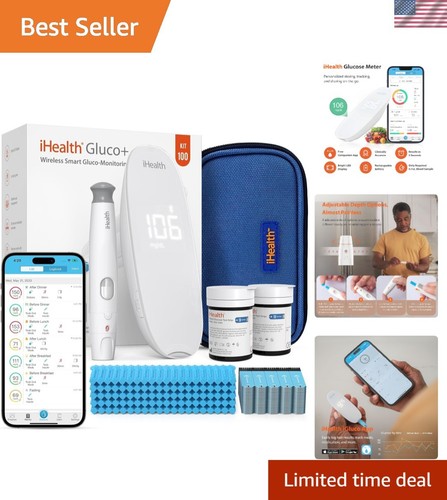
These are the factors that actually affect your day-to-day experience, not just technical specs. See what’s available for your preferred wear time and data update frequency.
Shopping new with fast Prime shipping? Amazon usually has the best stock.
Shop CGMs →How the Major CGM Categories Stack Up
Instead of listing individual brands or model numbers, here’s how the main types of CGMs compare for the most critical user profiles. This table focuses on the factors that make or break real-world satisfaction, not just marketing claims.
| Profile | Sensor Wear Time | Data Update Interval | Calibration | App Integration | Insurance Coverage | Upfront Cost (est.) | Who It’s Best For |
|---|---|---|---|---|---|---|---|
| Factory-calibrated, high-frequency option | 10–14 days | 1–5 min | None (factory) | iOS, Android, some smartwatches | Often covered for insulin users | $$$ | Tech-savvy, want fingerstick-free use, rapid data |
| Entry-level, self-calibrated pick | 7–10 days | 5–15 min | Daily fingerstick | Basic smartphone app | Variable | $$ | Budget-focused, non-insulin users |
| Extended-wear, subscription-based | 14–21 days | 5 min | Factory or minimal | App + web dashboard | Rarely covered | $$$ + monthly fee | Want less frequent sensor changes, DIY users |
| Integrated pump-compatible | 7–14 days | 1–5 min | Factory or daily | Pump interface + app | Usually covered for insulin users | $$$ | People on insulin pumps, advanced diabetes management |
| Non-prescription, wellness-focused | 14 days | 15 min | Factory | App only | Not covered | $$–$$$ | Biohackers, fitness tracking, non-diabetic users |
What Sensor Accuracy Numbers Really Mean
The single most quoted metric in CGM marketing is MARD (Mean Absolute Relative Difference), which expresses average error compared to a lab reference. In practice, a MARD under 10% is considered good; top-tier devices advertise 8–9%. However, the number is only part of the story. Accuracy can drop noticeably at very low (<70 mg/dL) or very high (>250 mg/dL) glucose levels.
For people who rely on CGM data to dose insulin, a 2–5% difference can mean the difference between catching a hypoglycemic event or missing it. For general wellness or fitness tracking, a MARD of 10–12% might be acceptable, especially if you don’t need to make real-time medical decisions. Always check whether the CGM you’re considering lists its MARD across the full glucose range (40–400 mg/dL), not just in the “normal” band.
Some users notice individual sensors can vary from the average—meaning that even a device with a “great” MARD can have outlier sensors that run high or low. Keep this in mind, and don’t be afraid to request a replacement if you see consistent out-of-range values.
Compare today’s deals on high-accuracy, factory-calibrated options if you need the most reliable readings.
Sensor Insertion: Comfort, Adhesives, and Skin Reactions
Most CGM sensors use a fine filament (0.3–0.4 mm) inserted just under the skin via a spring-loaded applicator. The process is quick but can sting, especially for first-timers or those with sensitive skin. Some models offer optional numbing pads or have thinner filaments for gentler insertion, but you’ll rarely find this information in basic product listings.
The adhesive used to keep the sensor in place is a major source of complaints—itching, redness, or sensor loss after showers or workouts. High-end models may offer hypoallergenic adhesives or extra overpatches for active users. If you have a history of adhesive allergies, check for third-party compatibility with barrier wipes or alternative patches. Sensor loss due to sweat or friction is more common in hot climates or during intense exercise.
Extended-wear sensors (14–21 days) are both a blessing and a curse: fewer insertions, but higher risk of adhesive irritation. Budget an extra $10–$20 per month for adhesive solutions if you’re prone to skin issues.
Related Guides
App Features That Actually Make a Difference
Modern CGMs almost always pair with a smartphone app, but the capabilities vary widely. Look for these practical differences:
- Real-time alerts: Only some apps let you set custom high/low glucose thresholds or silent overnight alarms. If you’re prone to nocturnal hypoglycemia, this is non-negotiable.
- Data sharing: The option to share live readings with a partner or caregiver can be a lifesaver, especially for parents or those with hypoglycemia unawareness.
- Integration: Some CGM apps sync directly with Apple Health, Google Fit, or fitness trackers; others are walled gardens. If you want to correlate glucose with exercise, food, or sleep, check for export options (CSV, API access, etc).
- Trend analysis: Look for apps that provide 7-, 14-, and 30-day averages, as well as “time in range” statistics. This is far more useful than a basic log of readings.
Subscription-based CGMs sometimes offer premium analytics, but these can add $20–$40 per month. Decide if you’ll actually use these features before paying extra. Check current prices and see which options include advanced app features out of the box.
Insurance, Prescriptions, and Out-of-Pocket Costs: What to Expect
Insurance coverage for CGMs is highly variable. For people with type 1 diabetes (and some type 2s on intensive insulin), most major insurers will cover at least part of the cost for FDA-cleared, prescription-only CGMs. Out-of-pocket costs can still range from $60 to $300 per month, depending on your plan and whether you need to buy transmitters separately.
For those without a qualifying diagnosis, over-the-counter or subscription wellness CGMs are available, but these are almost never covered by insurance. Expect to pay $120–$250 per sensor (lasting 14–21 days), plus possible app or platform fees. Some services offer discounts for multi-month bundles or first-time users, but ongoing costs add up quickly.
Always factor in the true annual cost, including replacement sensors, transmitters (if required), and any recurring app fees. Some lower-priced options appear cheaper but require frequent purchases of accessories or adhesives.
Common Pitfalls When Choosing a CGM
- Assuming all CGMs are fingerstick-free: Many still require daily calibration. If you want zero fingersticks, double-check this detail.
- Overlooking sensor placement limits: Not all devices are approved for every body site. Some perform poorly on the abdomen for lean users, or on the arm for those with high activity levels.
- Ignoring app ecosystem lock-in: If you want to export data or use third-party apps, avoid CGMs with closed platforms.
- Underestimating adhesive issues: Skin reactions are common. Have a backup plan for sensitive skin.
- Focusing only on upfront cost: Cheaper sensors often have higher long-term costs due to short wear times or required accessories.
Shopping new with fast Prime shipping? Amazon usually has the best stock.
Compare CGM Options →FAQ: Real Questions About Continuous Glucose Monitors
How accurate are continuous glucose monitors compared to fingerstick meters?
Most modern CGMs have a MARD (Mean Absolute Relative Difference) of 8–12%, while top-tier fingerstick meters approach 5–8%. CGMs can lag behind blood glucose during rapid changes, so fingersticks may still be needed for dosing decisions or when symptoms don’t match readings.
Can I use a CGM if I’m not diabetic?
Some wellness-focused CGMs are available without a prescription and are marketed to athletes, biohackers, and those curious about glucose trends. However, insurance typically does not cover these, and the clinical utility is less clear for people without diagnosed glucose abnormalities.
How often do I need to change the sensor?
Sensor wear time varies by model: most require replacement every 7–14 days, with some extended-wear versions lasting up to 21 days. Adherence and skin integrity often determine whether you’ll get the full advertised wear time.
What happens if my sensor falls off early?
If a sensor detaches before its intended replacement date, most manufacturers or providers will offer a one-time replacement, especially if you report adhesive or skin issues. Always contact support promptly and document the issue for a smoother process.
Do CGMs work during exercise or swimming?
Most CGMs are water resistant (typically rated IP67 or IP68), allowing for showers and brief swims. Intense exercise can increase the risk of sensor detachment or cause temporary data lags due to rapid glucose shifts. Using overpatches or additional adhesives can help maintain placement during activity.
Is it possible to share my CGM data with my doctor or family?
Many CGM apps allow for real-time or periodic data sharing with healthcare providers, family, or caregivers. Features vary by app ecosystem, so check whether your preferred device supports secure sharing, exports, or integration with telehealth platforms.
What should I do if my CGM readings seem off?
First, check for sensor placement or adhesive issues, and confirm readings with a fingerstick if possible. If discrepancies persist, contact customer support for troubleshooting or a potential replacement. Never adjust medication solely based on CGM readings if they seem unreliable.
Can I reuse a CGM sensor or transmitter to save money?
Most CGM sensors are designed for single-use and have built-in mechanisms to prevent reuse for safety and accuracy reasons. Some transmitters may be reusable for several sensor cycles, but attempting to extend use beyond the recommended period can compromise data reliability and is generally not advised.
What technical specs should I check before choosing a CGM?
Key specifications to review include sensor wear time (typically 7–21 days), data update interval (1–15 minutes), MARD accuracy (preferably under 10%), and IP rating (IP67/IP68 for water resistance). Also check for compatibility with your smartphone’s operating system and whether the app supports exporting data in common formats like CSV or PDF.
Final Take: Choose Based on Wear Time, Calibration, and Real App Features
The best continuous glucose monitor for you isn’t the one with the flashiest app or the lowest upfront price—it’s the one that matches your daily routine, skin sensitivity, and data needs. Prioritize factory-calibrated, fingerstick-free models if you want maximum convenience, but don’t overlook adhesive comfort and app compatibility. Always run the numbers on total annual cost, not just what’s advertised per sensor. Take your time to compare real-world specs, and don’t hesitate to view options that align with your actual lifestyle—your skin and your sanity will thank you.